SMSTunnel for OpenCart
Order texts from your own phone and number
Order texts customers can reply to
A text to you for every new order, and a text to the customer when their order ships, is complete, is canceled or refunded, or gets any status you choose. Your store hands each text to your SMSTunnel account, and your own Android phone sends it from its own SIM. Customers see your number and can reply to it.
What your store texts
New order
To you, on up to 5 numbers, one text each
{store_name}: new order #{order_id} from {firstname} {lastname}, {total}.
Shipped
To the customer (ticked when you install it)
Hello {firstname}, your order #{order_id} from {store_name} is on its way. {comment}
Complete
To the customer (ticked when you install it)
Hello {firstname}, your order #{order_id} from {store_name} is complete. Thank you!
Canceled
To the customer (ticked when you install it)
Hello {firstname}, your order #{order_id} from {store_name} has been canceled. Reply to this text if you have any questions.
Refunded
To the customer (ticked when you install it)
Hello {firstname}, your order #{order_id} from {store_name} has been refunded.
Any other status
To the customer, if you tick it (Pending and Processing have their own texts)
Hello {firstname}, your order #{order_id} from {store_name} is now: {status}.
These are the suggested texts. Each customer gets them in the language they ordered in (English or Romanian), and
you can reword each one. The comment you type when you change an order's status (a tracking number, say) goes into
{comment} when you tick Notify customer.
Built for real stores
- A text never stops an order. Timeouts are short, and if SMSTunnel is slow or can't be reached, the order goes through and the text is marked as not sent, with the reason. Send again sends it with one click.
- Numbers that work. Local numbers get the calling code of the order's billing country (then of
its delivery country, then the default country you choose):
(415) 555-0123on a United States order becomes+14155550123. Invalid numbers, premium-rate numbers and short codes are skipped, with the reason. - Never twice. Each order gets each text once, even if it gets the same status again. A text whose sending SMSTunnel didn't confirm is never sent again on its own.
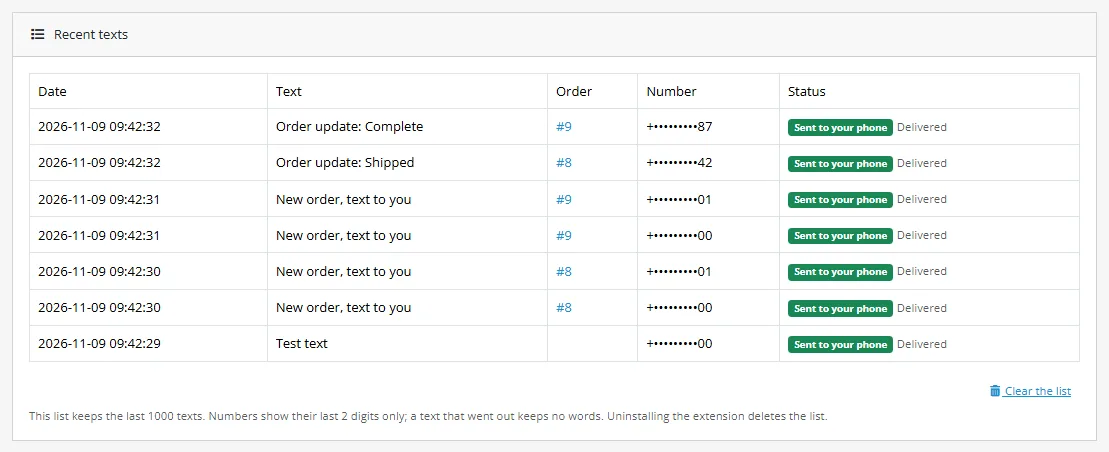
- Every text in one list. The extension's page shows the last texts, whether they went out, what your phone did with them (sent, delivered) and why one did not. Numbers show only their last 2 digits.
- Replies reach you. The texts come from your number, so customers' answers arrive on your phone.
- Free, under the GPL, with its code on GitHub. Nothing in it is encrypted, it downloads nothing after you install it, and it calls only SMSTunnel, and only once you save a key. Its pages are in English and Romanian.
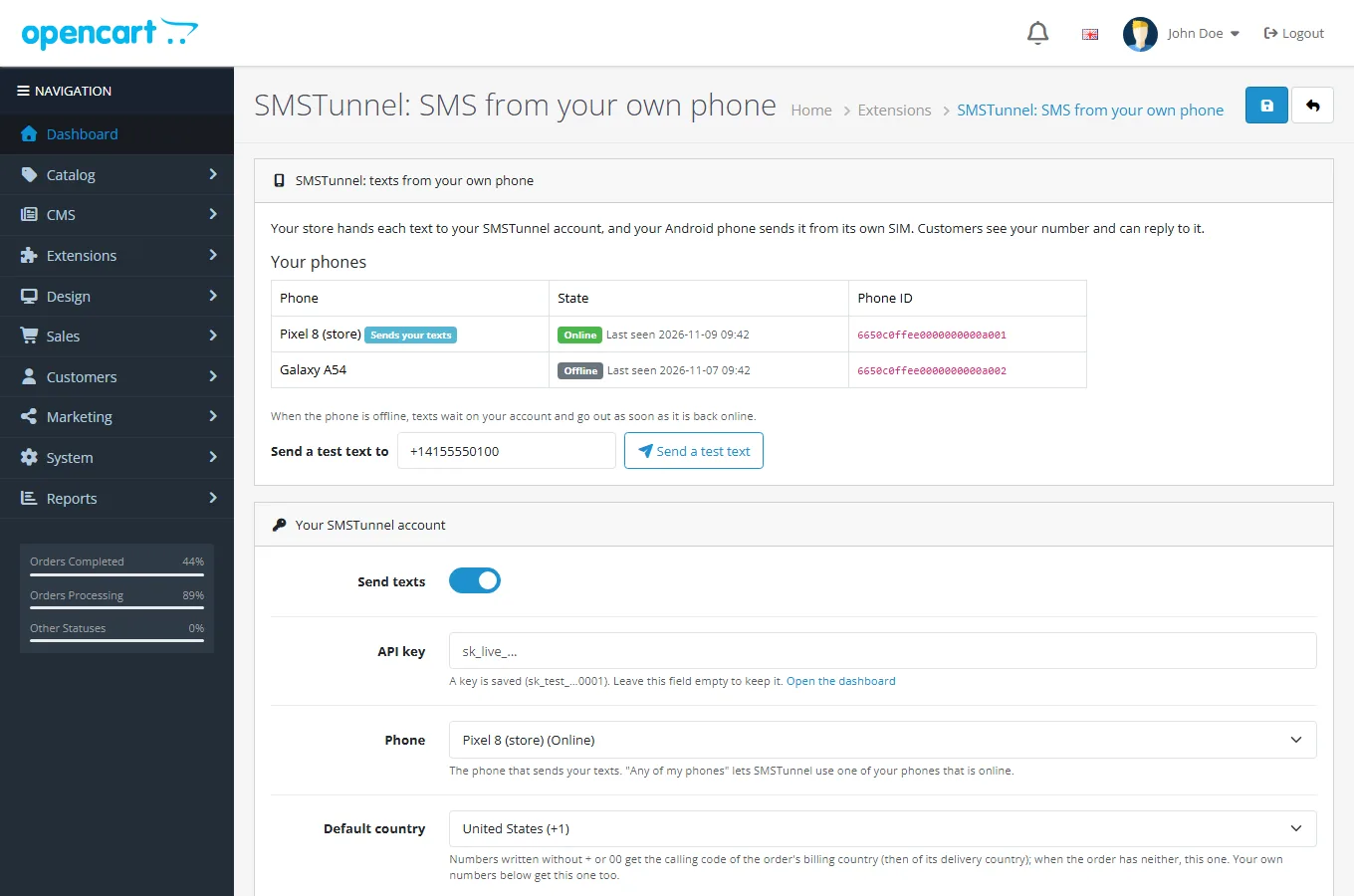
The extension's page
1. Get your key
- 1. Install the SMSTunnel app from Google Play on your Android phone and sign in.
- 2. In your dashboard, open Apps → Add an app, pick OpenCart, name it (for example "OpenCart") and click Create the key.
- 3. Copy the key right away: it's shown only once. You can stop or delete the app there anytime, and OpenCart can't send texts anymore.
Get the steps with your key in them
It opens Add an app with OpenCart picked. Once the key is made, the dashboard shows every step and command with the key already filled in, ready to copy.
2. Install the extension
- 1. Download the package for your OpenCart:
smstunnel.ocmod.zipfor OpenCart 4.0.2 to 4.1 (keep the file name: OpenCart 4 names the extension after it) orsmstunnel-oc3.ocmod.zipfor OpenCart 3.0. Both are also on the OpenCart Marketplace. Download for OpenCart 4Download for OpenCart 3.0 OpenCart Marketplace - 2. In your admin, open Extensions → Installer and upload the file. On OpenCart 4, then click the green + next to it in the list.
- 3. Open Extensions → Extensions, choose Modules, install SMSTunnel with its green + and click Edit. You need OpenCart 3.0.x, 4.0.2 or 4.1, with PHP 7.1 or newer.
3. Fill in the settings
Then save with the blue button at the top of the page:
- Send texts
- On.
- API key
- The key from step 1. Once saved, only its start and end are shown; leave the field empty to keep it.
- Phone
- The phone that sends your texts. Any of my phones lets SMSTunnel use one of your phones that is online.
- Default country
- For numbers written without + or 00, when the order has no billing or delivery country. Your own numbers get it too.
- Text me about new orders
- On, with Your numbers: one or more (at most 5), separated by commas, in international format such as
+14155550123 - Text customers about their orders
- On, then tick the statuses under When the order status becomes. Each status has its own text.
- Advanced
- SMSTunnel server: for testing only. Leave it as it is.
Texts can use these placeholders:
- {firstname}, {lastname}
- The customer's name.
- {order_id}
- The order number.
- {total}
- The order total, with its currency.
- {store_name}
- Your store's name.
- {status}
- The order's new status.
- {comment}
- The comment typed with the status change, only when Notify customer is ticked: put the tracking number there.
4. Send yourself a test text
Once the key is saved, the top of the extension's page lists your phones, online or offline, with their Phone ID. Type your number in Send a test text to and click Send a test text: your phone texts "This is a test text from {store_name}. Your order texts will come from this phone."
On OpenCart 4, checkout asks for a telephone number only if you turn it on: open System → Settings, edit your store, and on the Option tab turn on Telephone Display and Telephone Required. Until then, the extension's page reminds you.
If a text doesn't go out
The list of recent texts on the extension's page shows each status: Sent to your phone, Waiting for your phone, Not sent, Skipped or Not confirmed, with the reason:
- "SMSTunnel refused the API key": the key was deleted or mistyped. Make a new one under Apps → Add an app and save it.
- "This API key may not send texts": make a new key under Apps → Add an app.
- "Too many texts at once, or the daily limit of your plan is reached": SMSTunnel takes 30 send requests a minute. Use Send again a little later.
- "SMSTunnel could not be reached" or "SMSTunnel had a problem": try again in a few minutes with Send again.
- Not confirmed: the text left for SMSTunnel but no answer came back in time, so it may have gone out. It is never sent again on its own: check Messages in your dashboard, and use Send again only if it isn't there.
- Skipped, "The order has no telephone number" or "not a mobile number SMSTunnel can text": the order has no number the extension can use. Premium-rate numbers and short codes are never texted.
- Waiting for your phone: your phone is offline. The text waits on your account and goes out as soon as the phone is back online.
Uninstalling the extension deletes its settings and its list of texts.
Questions
- Do I need a special SIM or number?
- No. Texts leave from the phone and SIM you already have, so customers see your usual number.
- Can customers reply?
- Yes. Replies reach your phone like any text.
- What if my phone is offline?
- Texts wait on your SMSTunnel account and go out as soon as the phone is back online. The extension's page shows which of your phones is online.
- Does it slow down checkout?
- A text takes a fraction of a second. If SMSTunnel cannot be reached, the extension waits a few seconds at most, writes the failure down, and the order goes through.
- Which numbers get texts?
- The telephone of the order, for the customer, and the numbers you enter, for you. Numbers that cannot be texted are skipped, and the extension says why.
- What does SMSTunnel receive?
- The number and the words of each text, nothing else from your store: no email, no address, no order contents.
Build it with an AI assistant
Copy this prompt into Claude, ChatGPT, Cursor or Copilot and replace the part in [brackets]. Don't paste your API key into the chat: the prompt doesn't need it.
Help me add a text message my OpenCart store doesn't send yet (such as a back-in-stock alert or a reminder for an unpaid order), with SMSTunnel.

About SMSTunnel (https://smstunnel.io): my own apps and tools hand text messages (SMS) to my SMSTunnel account, and my own Android phone sends them from my own number, on my own SIM and plan. The phone runs the SMSTunnel app from Google Play (https://play.google.com/store/apps/details?id=io.smstunnel.app), signed in to my account.

What I want: [describe what should send a text, to whom, and when]

How it works:
- My store runs OpenCart 3.0, 4.0 or 4.1 with the extension "SMSTunnel for OpenCart" (Extensions > Extensions > Modules > SMSTunnel; its code is at https://github.com/narcisbodea/smstunnel-opencart). It already texts me about new orders and texts customers when their order gets a status I ticked. Its settings are in OpenCart's setting table (code module_smstunnel, store 0): the API key in module_smstunnel_api_key and the optional phone ID in module_smstunnel_device_id.
- Write a small separate OpenCart extension for the new text, on OpenCart's events or a scheduled task, that calls the API from the server, never from the browser, and reads the key from the settings, never from source code.
- Send with short timeouts (3 seconds to connect, 8 in all), and never let a failed text stop a page or a checkout: write it to OpenCart's error log instead.
- Take the number from the order's telephone, complete local numbers with the calling code of the order's country, and skip invalid ones.
- The API key comes from my SMSTunnel dashboard (https://dashboard.smstunnel.io): Apps → Add an app → Create the key. It is shown only once and can send texts and check whether they went out.

SMSTunnel API facts:
- Send a text: POST https://smstunnel.io/api/v1/sms/send with the headers "X-API-Key: <key>" and "Content-Type: application/json", and the JSON body {"to": "+14155550123", "message": "..."}. Optional: "deviceId" (which of my phones sends it; default: my main phone) and "defaultCountryCode". Other fields are refused with 400.
- Call it from a server: browsers can't send the X-API-Key header to SMSTunnel (CORS), and the key must stay secret.
- One recipient per call. To text several people, make one call per number.
- Numbers: international format, with + and the country code. For numbers written without + or 00, "defaultCountryCode" ("44", "+44" or "0044") completes them, and it always takes precedence over the country set for the phone.
- A text can be up to 1600 characters (10 joined SMS).
- Sign-in codes: POST https://smstunnel.io/api/v1/sms/send-2fa, same headers and fields. The text must contain the code as 4 to 10 digits standing on their own (like 482913) or as 123-456, and can be up to 320 characters; otherwise the answer is 400 "No valid verification code found". Codes have their own daily allowance. My app creates and checks the code; SMSTunnel only delivers the text.
- Success: HTTP 200 {"success": true, "messageId": "...", "data": {"messageId": "...", "branded": false, ...}}. "queued": true is added when the phone is offline: the text waits and goes out as soon as the phone is back (for up to 3 days). On the Free plan, 25 texts a day (500 a month) go out as written, up to 25 more a day go out with a short "free by smstunnel.io" line added ("branded": true), and past that the answer is 429.
- Errors: 400 bad input (the "message" field says why, sometimes as a list); 401 missing or invalid key; 403 the key lacks a permission ("code": "PERMISSION_REQUIRED", "permission": "...") or my plan does not include the feature; 429 with a Retry-After header: too many requests (30 send requests a minute per API key, 90 for all keys of one account together), so wait that many seconds, then retry; 429 without Retry-After: the plan's limit for the day or month is reached, so don't retry before then; 5xx: retry later, with a limit.
- Safe retries: send the header "Idempotency-Key: <one key per text>" (1 to 255 printable ASCII characters, such as order-1042-shipped or a UUID stored with the text). A repeat with the same key within 24 hours gets the first answer back (or the same 5xx error) instead of a second text; 409 while the first request is still running, 422 if the key was used for a different text.
- Status: GET https://smstunnel.io/api/v1/sms/status/{messageId} answers {"success": true, "data": {"status": ...}}, with pending, sent, delivered or failed. If "unconfirmed" is true, the phone handed the text to its SIM without getting a confirmation: it was probably sent, so never resend it automatically.

Rules for your answer:
- Keep the API key in an environment variable or the platform's secret store (for example SMSTUNNEL_API_KEY). Never put it in source code, in a repository, or in code that runs in a browser or a mobile app: call SMSTunnel from a server. I will not paste my key in this chat; use a placeholder.
- Validate phone numbers before sending (international format, like +14155550123) and skip or report the invalid ones.
- Handle errors: log or show what went wrong, retry only after 429, 5xx or network errors and only a few times, and never send the same text twice.
- Only send texts people expect from me: alerts to myself, reminders, sign-in codes, updates they asked for. No unsolicited texts.
Responsible use
Built for alerts to yourself and your team, and texts people expect from you. One text goes to one number. Sending unsolicited messages from a consumer SIM generally breaches mobile carrier terms of service.
OpenCart is a trademark of OpenCart Limited. SMSTunnel is a third-party integration and is not affiliated with, endorsed by, or sponsored by OpenCart Limited.
More texts from your own tools
No phone paired yet?
Install the Android app and sign in with your account, and you're ready in about a minute.
