SMSTunnel for Odoo
Odoo's texts from your own phone and number
Order, delivery and appointment texts from a number customers know
Odoo can text a customer from any contact or document, confirm deliveries, and send reminders and texts from automated actions. With the SMSTunnel module, you choose Send via SMSTunnel next to Odoo's own choices, and Odoo hands each text to your SMSTunnel account; your own Android phone sends it from its own SIM. Customers see your number, can save it and reply, and each text costs what your carrier charges.
What it texts
A contact or document
The SMS button next to a phone number, or Send SMS on a record
Hi Maria, your order S00042 is ready for pickup at our Main Street shop, open until 18:00.
Delivery confirmation
Inventory → Settings → SMS confirmation, when a delivery is validated
My Company: We are glad to inform you that your order n° S00042 has been shipped.
Automated action
Settings → Technical → Automation Rules, action "Send SMS" with an SMS template
Welcome Elena! You can reply to this number anytime.
Reminders
Calendar and event reminders set to "SMS Text Message"
Reminder: your appointment is tomorrow at 10:00.
What you need
- Odoo 17, 18 or 19, Community or Enterprise, on Odoo.sh or your own server, with an Odoo build from September 2025 or later. Odoo Online can't install modules that aren't Odoo's own, but it can still text your own numbers: see Odoo Online below.
- An Android phone with the SMSTunnel app from Google Play, signed in to your account.
1. Get your key
- 1. Install the SMSTunnel app from Google Play on your Android phone and sign in.
- 2. In your dashboard, open Apps → Add an app, pick Odoo, name it (for example "Odoo") and click Create the key.
- 3. Copy the key right away: it's shown only once. You can stop or delete the app there anytime, and Odoo can't send texts anymore.
Get the steps with your key in them
It opens Add an app with Odoo picked. Once the key is made, the dashboard shows every step and command with the key already filled in, ready to copy.
2. Install the module
The module's repository has a branch for each Odoo version, 17.0, 18.0
and 19.0, each with the module folder sms_smstunnel. Pick the one of
your version.
Odoo.sh
- 1. Add the repository to your Odoo.sh project as a submodule,
on the branch of your version, and push (Odoo.sh adds submodule folders to the addons path):
Or copy the
git submodule add -b 17.0 https://github.com/narcisbodea/smstunnel-odoo.git smstunnel-odoo git commit -m "Add SMSTunnel SMS" && git pushsms_smstunnelfolder of your version into your project repository. - 2. When the build is ready: Apps → Update Apps List, search for SMSTunnel, click Activate.
Your own server
- 1. Copy the
sms_smstunnelfolder of your version into a folder listed inaddons_path, and restart Odoo. - 2. Apps → Update Apps List (developer mode), search for SMSTunnel, click Activate.
A listing on the Odoo Apps store is coming soon. Today the module installs from GitHub, as above.
3. Choose SMSTunnel in Settings
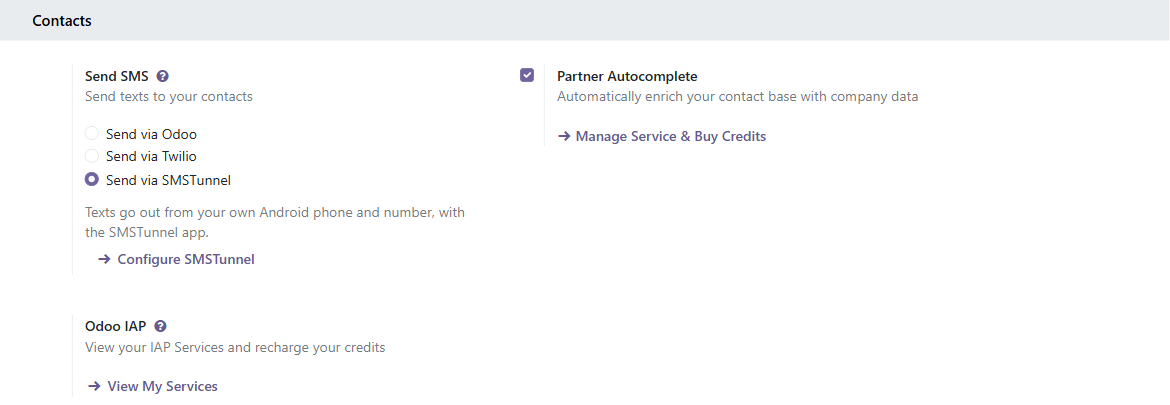
In Odoo, open Settings → General Settings, find Send SMS under Contacts, choose Send via SMSTunnel and click Configure SMSTunnel:
- SMSTunnel API key
- The key from step 1. Only Settings administrators can read it; it is shown masked.
- Phone ID
- Optional: which of your phones sends the texts. Empty means your main phone (Phones in the dashboard has a Copy button).
- Default country code
- Optional: completes numbers written without + or 00, such as 0721 123 456. Empty means the calling code of the company's country.
4. Test it with your own number
Type your number under Test number and click Send a test text. Check the key and list my phones shows your phones and whether they are online. Then Save: from now on every text Odoo sends for this company goes through your phone. Each company chooses its own provider, so in a database with several companies one can use SMSTunnel while another keeps Odoo's credits or Twilio.
Worth knowing
- One text per number, up to 1600 characters.
- Odoo shows each text's status in the chatter: Sent, Processing while your phone is offline (the text waits up to 3 days and goes out when it's back), Delivered, or an error with SMSTunnel's reason.
- If SMSTunnel can't be reached, texts wait in Odoo's queue and are tried again after 1, 2, 5, 10 and 30 minutes, then every hour. A text still not sent after 8 tries is marked as an error (Server Error): resend it from the chatter.
- Each company chooses its own SMS provider.
- SMS mailings (Odoo's mailing app) are refused: SMSTunnel sends texts people expect, one at a time. A company that sends such mailings keeps Odoo's credits or Twilio for them.
- Copies of the database made by Odoo.sh for staging lose the key, so they never text real customers.
- Automation rules on "create and edit" need a "Before update" filter, or each save sends another text.
If it doesn't work
- "Unregistered Account" on a text: the key is wrong or deleted. Paste it again in Configure SMSTunnel, then Send & Close in the failure dialog (Odoo 17 and 18) or Retry in Settings → Technical → SMS.
- "Wrong Number Format": SMSTunnel refused the number (international format expected; premium-rate and satellite numbers are blocked).
- The module isn't in the Apps list: update the list (developer mode). On your own server, check
that Odoo has the core
sms_twiliomodule; otherwise update Odoo. -
401"Invalid or expired API key": the key is wrong or was deleted. "API key is required. Use X-API-Key header.": the key isn't in anX-API-Keyheader. SMSTunnel reads the key only from that header: Bearer or Basic authentication won't work. -
403withPERMISSION_REQUIRED: the key may not send texts. Make a new one under Apps → Add an app. -
400"property … should not exist": the body has a field SMSTunnel doesn't know. Send onlytoandmessage(and, if you need them,deviceIdanddefaultCountryCode). "message must be shorter than or equal to 1600 characters": shorten the text. "Phone number must contain…": put the number in international format, like+14155550123. -
400with "to must be a string" and "message must be a string": the body didn't arrive as JSON. Add the headerContent-Type: application/json. -
404"Cannot GET /api/v1/sms/send": the tool sent a GET. Choose POST. -
429: too many texts at once. SMSTunnel takes 30 send requests a minute. Wait a minute and try again. - No text, but no error? If your phone is offline, the text waits and goes out as soon as the phone is back online. Open the SMSTunnel app on the phone to check it's linked.
In your own code
Texts created in code go through the provider of their company, like any other:
self.env['sms.sms'].sudo().create({'number': '+14155550123', 'body': 'Your order is ready.'}).send()
For a sign-in code from a custom module, set smstunnel_sign_in_code: SMSTunnel then sends it
on its separate allowance for codes. The text must contain the code as 4 to 10 digits standing on their own (like
482913, or 123-456) and be at most 320 characters.
self.env['sms.sms'].sudo().create({
    'number': '+14155550123',
    'body': 'Your sign-in code is 482913',
    'smstunnel_sign_in_code': True,
}).send()
Odoo Online: texts to your own numbers
Odoo Online can't install the module, but its automation rules can call an SMSTunnel webhook. That is enough
for texts to your own number, or to a few numbers of your team, when something happens in Odoo: an order is
confirmed, a lead reaches a stage, a ticket comes in. The text can carry the record's fields, like
New order S00042: 1250. The same works on Odoo.sh and your own server, from Odoo 17 on.
What it can't do: text the record's own number, such as the customer of the order. A webhook only texts the numbers saved in it, never a number from the call, so a leaked address can't text anyone else. For texts to customers, use the module on Odoo.sh or your own server.
1. Make the webhook in SMSTunnel
A webhook address is a secret URL that turns each call into a text to the numbers you save with it, sent by your own phone from your own number. The call only sets the words, never the number, so Odoo Online needs no key.
- 1. Install the SMSTunnel app from Google Play on your Android phone and sign in.
- 2. In your dashboard,
open Apps → Webhooks, click New webhook and pick Odoo Online.
That fills in the name and the text of the message,
New order {{name}}: {{amount_total}}. - 3. Add the numbers that should get the texts, with
+and the country code: up to 10, and each one gets its own text. Then click Create the webhook. - 4. Copy the address, which looks like
https://smstunnel.io/api/v1/webhook/<token>. Keep it secret, like a password: whoever has it can text these numbers from your phone, though never any other number.
Get the steps with your address in them
It opens New webhook with Odoo Online picked. Once the webhook is made, the dashboard shows its address and the Odoo Online steps with the address already in them, ready to copy, and Send a test, which texts the webhook's numbers.
One webhook per kind of text: for leads too, make a second one with its own text.
- Calls an hour: 20 unless you set another number, up to 500. The limit counts calls, not texts: each call texts every number of the webhook, and a test from the dashboard counts too. Past the limit, calls are refused until the hour is over, so a storm of alerts can't use up your texts.
- You can copy the address again anytime, under Address and setup. If it gets out, New address in the webhook's menu replaces it, and the old one stops working at once.
- The text of the message picks the words out of each call. Texts are cut at 480 characters.
-
Or with the API, for scripts:
POST /api/v1/webhookswith your sign-in token, as the webhooks guide shows.
2. Make the automation rule in Odoo
- 1. Settings → Activate the developer mode (at the bottom of the page).
- 2. Settings → Technical → Automation → Automation Rules → New. If the menu isn't there, open Apps, remove the Apps filter, search for Automation Rules and activate it.
- 3. Model: Sales Order. Trigger: State is set to, value Sales Order (the order is confirmed).
- 4. Actions To Do → Add an action, of type
Send Webhook Notification. In URL, paste the webhook's address. Under
Fields, pick the fields the text uses, here Order Reference
(
name) and Total (amount_total): the Sample Payload shows the names to write between{{ }}. - 5. Save, and confirm an order: the text reaches the webhook's numbers.
{"_action": "Text me confirmed orders(#17)", "_id": 42, "_model": "sale.order",
 "amount_total": 1250.0, "date_order": "2026-11-05 09:30:12", "id": 42,
 "name": "S00042", "partner_id": 7, "state": "sale"}
SMSTunnel texts New order S00042: 1250. _action,
_id and _model come with every call; the other keys are the fields
picked in the rule. Numbers lose a trailing .0, dates and times are UTC, and a field that
isn't in the call stays empty.
Good to know about Odoo's side
- Odoo sends the fields of the rule's own model only. A many-to-one field arrives as a number
(
partner_id: 7), not the customer's name, so use the record's own text fields (on a lead:contact_name,partner_name). - Odoo waits 1 second for SMSTunnel and never sends the same call again. When a call fails, only Odoo's server log says so, and Odoo Online doesn't show you that log: check Messages in your dashboard, and the webhook's row in Apps → Webhooks.
- Odoo 19 and later call the webhook once the record is saved. Odoo 17 and 18 call it during the save, so a save that fails afterwards may still have texted you.
- A rule on On save (17, 18) or On create and edit (19 and later) runs at every save of a matching record. Set a Before Update Domain so each record texts once.
- Calls an hour: 20 unless you raise it with Edit, up to 500. It counts
calls, and each call texts every number of the webhook. Past it, or past 60 calls a minute, SMSTunnel
answers
429and Odoo drops the call. - Odoo writes the webhook's address in its server log. If it gets out, make a New address in Apps → Webhooks and put it in the rule: the old one stops working at once.
- The text has gaps? The names between braces don't match the Sample Payload, or the field isn't picked under Fields.
Questions
- Does it work on Odoo Online?
- Yes, for texts to your own numbers: an automation rule's Send Webhook Notification calls an SMSTunnel webhook (see Odoo Online). The module itself doesn't install there, since Odoo Online only runs Odoo's own apps, so texts to customers need Odoo.sh or your own server.
- Community or Enterprise?
- Both: the module only uses Odoo's SMS features. Its license is LGPL-3, the license of Odoo Community and of its core SMS modules.
- Do I still need Odoo's SMS credits?
- Not for the company that sends via SMSTunnel. Your carrier's usual price applies to each text, plus your SMSTunnel plan.
- Can customers reply?
- Yes: replies arrive on your phone like any text.
- What about SMS mailings?
- No: those mailings are refused. SMSTunnel is for texts people expect, one at a time.
Build it with an AI assistant
Copy this prompt into Claude, ChatGPT, Cursor or Copilot and replace the part in [brackets]. Don't paste your API key into the chat: the prompt doesn't need it.
Help me make Odoo send its texts from my own phone with SMSTunnel.

About SMSTunnel (https://smstunnel.io): my own apps and tools hand text messages (SMS) to my SMSTunnel account, and my own Android phone sends them from my own number, on my own SIM and plan. The phone runs the SMSTunnel app from Google Play (https://play.google.com/store/apps/details?id=io.smstunnel.app), signed in to my account.

What I want: [describe what should send a text, to whom, and when]

How it works:
- The free module "SMSTunnel SMS" (technical name sms_smstunnel, https://github.com/narcisbodea/smstunnel-odoo) for Odoo 17.0, 18.0 and 19.0 on Odoo.sh or self-hosted; Odoo Online cannot install it. Install the folder of my version, then Apps → Update Apps List → SMSTunnel → Activate. It needs Odoo builds from September 2025 or later (Odoo installs the core "Twilio SMS" module, sms_twilio, with it).
- Settings → General Settings → Send SMS → "Send via SMSTunnel" → "Configure SMSTunnel": API key, optional Phone ID (which phone sends; empty = my main phone) and Default country code (completes numbers written without + or 00; empty = the company's country). "Send a test text" checks it.
- Then everything in Odoo that sends texts for that company goes through my phone: the SMS button of a contact or record, SMS templates (Inventory → Settings → SMS confirmation of deliveries), automation rules with the "Send SMS" action and an SMS template, calendar and event reminders. Each company chooses its own provider.
- Statuses in the chatter: Sent; Processing while my phone is offline (the text waits up to 3 days); Delivered; Error with SMSTunnel's reason. If SMSTunnel can't be reached or asks to slow down, texts wait in Odoo's queue and the "SMS: SMS Queue Manager" cron tries again (after 1, 2, 5, 10, 30, then every 60 minutes); a text still not sent after 8 tries (a 429 doesn't count) becomes Error: Server Error and is resent from the chatter.
- Texts of SMS mailings (Odoo's mailing app) are refused. Automation rules on create and edit need a "Before update" filter so they fire once.
- On Odoo Online, without the module: texts to my own numbers only. In my SMSTunnel dashboard, Apps → Webhooks → New webhook → Odoo Online, with my numbers (up to 10) and a text of the message with the record's fields, like "New order {{name}}: {{amount_total}}"; copy the address. In Odoo (developer mode): Settings → Technical → Automation → Automation Rules → New, for example model Sales Order, trigger "State is set to" Sales Order, then an action "Send Webhook Notification" with the address as URL and, under Fields, the fields the text uses (the Sample Payload shows their names). Odoo sends the rule's own fields (a many-to-one field arrives as a number), waits 1 second and never retries. A webhook never texts the record's own number, such as the customer: for that, the module on Odoo.sh or my own server.
- In custom code: create sms.sms records (number, body) and call send(); for a sign-in code (4 to 10 digits, at most 320 characters) also set smstunnel_sign_in_code=True.
- One recipient per request: SMSTunnel sends one text to one number. For several people, one request (or one notification) per number.
- Answers: 200 {"success": true, "messageId": "…"}; 401 wrong or deleted key; 403 the key lacks a permission ("code": "PERMISSION_REQUIRED"); 400 a missing, unknown or too long field; 429 too many requests (30 sends a minute, with Retry-After): wait and retry; without Retry-After, the plan's limit for the day or month is reached. If my phone is offline the text waits and goes out when it is back, within 3 days.
- The API key comes from my SMSTunnel dashboard (https://dashboard.smstunnel.io): Apps → Add an app → Create the key. It is shown only once and can send texts and check whether they went out.

Rules for your answer:
- Do not ask for my SMSTunnel password or API key and do not put a real key in your answer; I will not paste it in this chat.
- Phone numbers must be in international format (+ and the country code).
- Help me test it with my own number first.
- Only send texts people expect from me. No unsolicited texts.
- Keep the key in Odoo's SMSTunnel settings; in custom code never put it in source code.
- Help me text only the person the record is about (their order, their delivery, their appointment).
Responsible use
Built for alerts to yourself and your team, and texts people expect from you. One text goes to one number. Sending unsolicited messages from a consumer SIM generally breaches mobile carrier terms of service.
Odoo is a trademark of Odoo S.A. SMSTunnel for Odoo is made by NARBOWEB SRL. SMSTunnel is a third-party integration and is not affiliated with, endorsed by, or sponsored by Odoo S.A..
More texts from your own tools
No phone paired yet?
Install the Android app and sign in with your account, and you're ready in about a minute.
