SMSTunnel for Joomla
A text for each new registration, from your own phone and number
Know right away when someone signs up
When someone registers on your Joomla site, you get a text. The plugin hands it to your SMSTunnel account, and your own Android phone sends it from its own SIM, to you and anyone on your team. SMSTunnel doesn't charge per text: it goes over your phone's own plan.
What it does
A text for each new account
Each number you set gets its own text, for example "New registration on Example Site: Jane Doe (jane@example.com)".
Your own words
Write the message yourself. The new user's name, username and email, and your site's name, are filled in.
Only visitors who sign up
If you want, accounts you create yourself in the administrator don't send a text, only the ones from the site's registration form.
What you need
- Joomla 5 or 6. Joomla 4.4 should work too, with PHP 8.1 or newer, but we haven't tested it.
- For texts about visitors who sign up, user registration turned on: Users → Manage → Options → Allow User Registration.
- An Android phone with the SMSTunnel app from Google Play, signed in to your account.
1. Get your key
- 1. Install the SMSTunnel app from Google Play on your Android phone and sign in. Sign in at your dashboard with the same account: the phone appears under Phones.
- 2. Open Apps → Add an app, name it (for example "Joomla") and copy its key. Copy it right away: it's shown only once. Delete the app there anytime, and your site can't send texts anymore.
2. Install the plugin
- 1. Download
plg_user_smstunnel.zip, the latest version: Download the plugin - 2. In Joomla, open System → Install → Extensions and drop the zip on Upload Package File.
- 3. Open System → Manage → Plugins, search for SMSTunnel and click User - SMSTunnel.
It's also listed in the Joomla Extensions Directory, with the same download.
Joomla Extensions Directory3. Fill in the settings
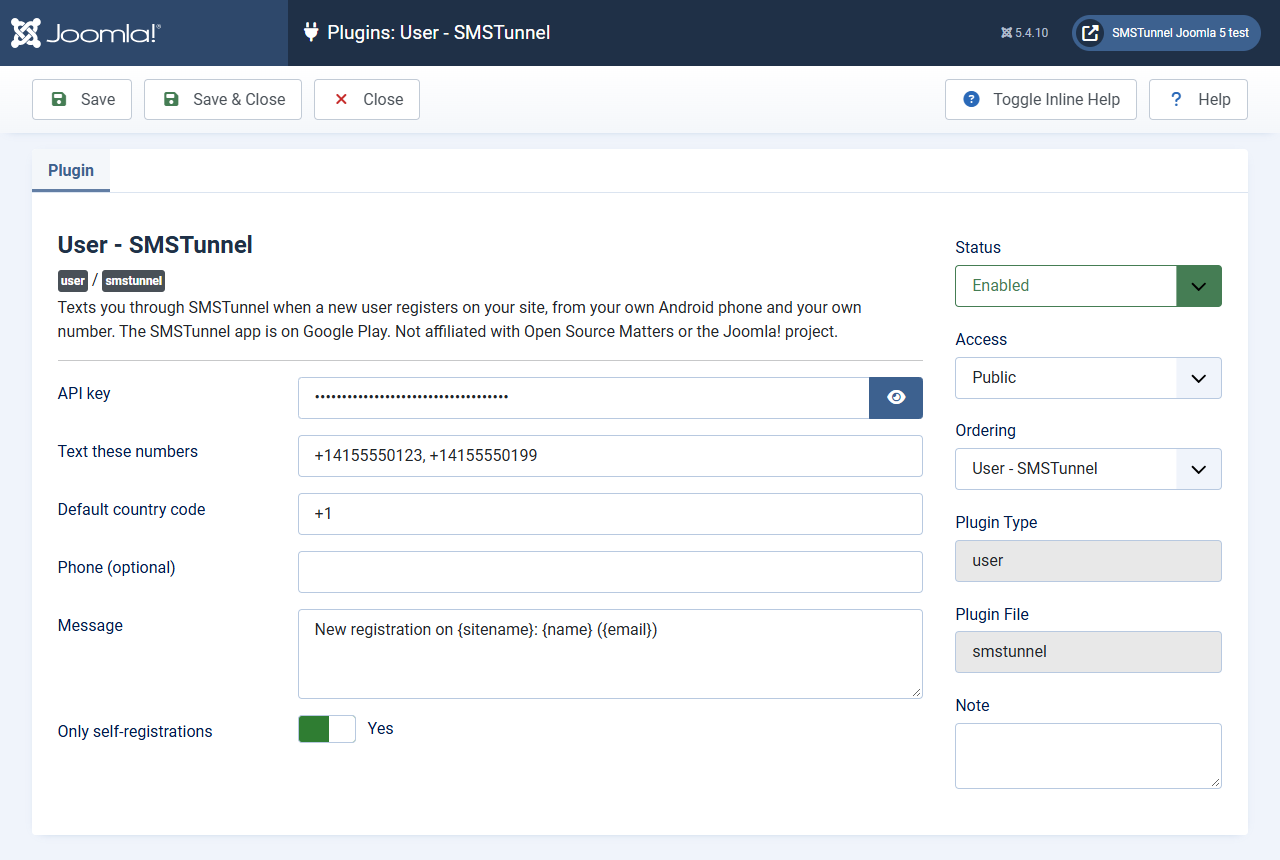
- API key
- The key from step 1. It is shown as a password field.
- Text these numbers
- Your number, or several separated by commas, in international format. Each number gets its own text.
+14155550123, +14155550199 - Default country code
- Only for numbers written without + or 00, for example
+40 - Phone (optional)
- The ID of the phone that sends the texts, from Phones in your dashboard. Leave it empty and SMSTunnel picks the phone.
- Message
- The text, with {name}, {username}, {email} and {sitename} filled in for each new user. The default is "New registration on {sitename}: {name} ({email})".
- Only self-registrations
- Yes: a text only when a visitor signs up on the site, not when an administrator creates an account.
Set Status to Enabled and click Save & Close. Then register a test account through the site's registration form: each number gets a text within seconds.
If a text doesn't arrive
-
The plugin writes the reason to
administrator/logs/plg_user_smstunnel.php, for example a rejected key or too many texts in a minute. The number shows only its last three digits (***199), and the words of the text aren't there. - In your dashboard, check that the phone is online under Phones, and that the numbers are in international format, or that a default country code is set.
Notes and limits
- One number per text: each number in the list gets its own text.
- Length: the text stops at 320 characters, and the name, username, email and site name at 60 each, so a long or odd name can't stretch it.
- Rate limit: about 30 texts a minute per key.
- Offline phone: the text waits on your account and goes out when the phone is back online.
- SMSTunnel unreachable: the reason is logged and the registration carries on; the text is not sent later.
- Timing: the plugin hands the text over while the new account is saved. That usually takes a fraction of a second, and at most 15 seconds per number if SMSTunnel doesn't answer.
- Updates: new versions show up under System → Update → Extensions, like any other extension.
- Where data goes: the plugin talks only to
https://smstunnel.io, through Joomla's own HTTP client. The key is never written to the log.
Questions
- Which Joomla versions?
- Joomla 5 and 6, tested on Joomla 5.4 with PHP 8.3 and Joomla 6.2 with PHP 8.4, also with the Behaviour - Backward Compatibility plugins turned off. Joomla 4.4 should work with PHP 8.1 or newer, but isn't tested.
- Can it text the person who registered?
- No: it texts the numbers you set, you and your team. To text your users, for example sign-in codes or reminders, call SMSTunnel from your own code: see PHP and the prompt below.
- Where is the API key kept?
- In the plugin's settings, in your Joomla database, like the settings of your other extensions. It goes only to smstunnel.io, over HTTPS. To stop your site from sending, delete its app in your dashboard.
- What if my phone is offline?
- The text waits on your account and leaves as soon as the phone is back online.
- What does it cost?
- The plugin is free (GPL). SMSTunnel has a free plan, and each text goes over your phone's own plan.
Build it with an AI assistant
Copy this prompt into Claude, ChatGPT, Cursor or Copilot and replace the part in [brackets]. Don't paste your API key into the chat: the prompt doesn't need it.
Help me make my Joomla 5 or 6 site send texts with SMSTunnel.

About SMSTunnel (https://smstunnel.io): my own apps and tools hand text messages (SMS) to my SMSTunnel account, and my own Android phone sends them from my own number, on my own SIM and plan. The phone runs the SMSTunnel app from Google Play (https://play.google.com/store/apps/details?id=io.smstunnel.app), signed in to my account.

What I want: [describe what should send a text, to whom, and when]

How it works:
- For new registrations there is a ready plugin, SMSTunnel for Joomla ("User - SMSTunnel", plg_user_smstunnel.zip from https://github.com/narcisbodea/smstunnel-joomla/releases/latest). Its settings: API key, Text these numbers, Default country code, Phone (optional), Message (with {name}, {username}, {email} and {sitename}) and Only self-registrations.
- For anything else (a contact form, a new article, an order in my shop extension), write a small Joomla plugin of the right group that subscribes to the event (SubscriberInterface), keeps the API key in the plugin's own settings (a password field), and calls the API with Joomla's HTTP client (Joomla\CMS\Http\HttpFactory::getHttp()) with a timeout, reading the answer with getStatusCode() and getBody().
- Log failures to the plugin's own log file (Log::addLogger for its category, then Log::add), without the words of the text, and never let a failed text break a page or a form.
- The API key comes from my SMSTunnel dashboard (https://dashboard.smstunnel.io): Apps → Add an app → Create the key. It is shown only once and can send texts and check whether they went out.

SMSTunnel API facts:
- Send a text: POST https://smstunnel.io/api/v1/sms/send with the headers "X-API-Key: <key>" and "Content-Type: application/json", and the JSON body {"to": "+14155550123", "message": "..."}. Optional: "deviceId" (which of my phones sends it; default: my main phone) and "defaultCountryCode". Other fields are refused with 400.
- Call it from a server: browsers can't send the X-API-Key header to SMSTunnel (CORS), and the key must stay secret.
- One recipient per call. To text several people, make one call per number.
- Numbers: international format, with + and the country code. For numbers written without + or 00, "defaultCountryCode" ("44", "+44" or "0044") completes them, and it always takes precedence over the country set for the phone.
- A text can be up to 1600 characters (10 joined SMS).
- Sign-in codes: POST https://smstunnel.io/api/v1/sms/send-2fa, same headers and fields. The text must contain the code as 4 to 10 digits standing on their own (like 482913) or as 123-456, and can be up to 320 characters; otherwise the answer is 400 "No valid verification code found". Codes have their own daily allowance. My app creates and checks the code; SMSTunnel only delivers the text.
- Success: HTTP 200 {"success": true, "messageId": "...", "data": {"messageId": "...", "branded": false, ...}}. "queued": true is added when the phone is offline: the text waits and goes out as soon as the phone is back (for up to 3 days). On the Free plan, 25 texts a day (500 a month) go out as written, up to 25 more a day go out with a short "free by smstunnel.io" line added ("branded": true), and past that the answer is 429.
- Errors: 400 bad input (the "message" field says why, sometimes as a list); 401 missing or invalid key; 403 the key lacks a permission ("code": "PERMISSION_REQUIRED", "permission": "...") or my plan does not include the feature; 429 with a Retry-After header: too many requests (30 send requests a minute per API key, 90 for all keys of one account together), so wait that many seconds, then retry; 429 without Retry-After: the plan's limit for the day or month is reached, so don't retry before then; 5xx: retry later, with a limit.
- Safe retries: send the header "Idempotency-Key: <one key per text>" (1 to 255 printable ASCII characters, such as order-1042-shipped or a UUID stored with the text). A repeat with the same key within 24 hours gets the first answer back (or the same 5xx error) instead of a second text; 409 while the first request is still running, 422 if the key was used for a different text.
- Scheduled texts: add "sendAt" (ISO 8601 with offset, like "2026-11-16T09:00:00+02:00", 1 minute to 30 days ahead) to the send body and SMSTunnel sends it at that time (counted then); the answer has "scheduled": true and "scheduledId". GET https://smstunnel.io/api/v1/sms/scheduled lists what the key scheduled, DELETE https://smstunnel.io/api/v1/sms/scheduled/{id} cancels one. Not for sign-in codes or encrypted texts.
- Status: GET https://smstunnel.io/api/v1/sms/status/{messageId} answers {"success": true, "data": {"status": ...}}, with pending, sent or failed. "sent" is the last good status: there are no delivery reports, so never wait for "delivered". If "unconfirmed" is true, the phone handed the text to its SIM without getting a confirmation: it was probably sent, so never resend it automatically.

Rules for your answer:
- Keep the API key in an environment variable or the platform's secret store (for example SMSTUNNEL_API_KEY). Never put it in source code, in a repository, or in code that runs in a browser or a mobile app: call SMSTunnel from a server. I will not paste my key in this chat; use a placeholder.
- Validate phone numbers before sending (international format, like +14155550123) and skip or report the invalid ones.
- Handle errors: log or show what went wrong, retry only after 429, 5xx or network errors and only a few times, and never send the same text twice.
- Only send texts people expect from me: alerts to myself, reminders, sign-in codes, updates they asked for. No unsolicited texts.
- Keep the API key on the server, in the plugin's settings; never in anything sent to the browser.
Responsible use
Built for alerts to yourself and your team, and texts people expect from you. One text goes to one number. Sending unsolicited messages from a consumer SIM generally breaches mobile carrier terms of service.
Joomla! is a registered trademark of Open Source Matters, Inc. SMSTunnel is a third-party integration and is not affiliated with, endorsed by, or sponsored by Open Source Matters or the Joomla! Project.
More texts from your own tools
No phone paired yet?
Install the Android app and sign in with your account, and you're ready in about a minute.